Skip to content
Why Lumenn AI?
How it Works?
Features
Partner With Us
Use Cases
Insights
Why Lumenn AI?
How it Works?
Features
Partner With Us
Use Cases
Insights
Login/Signup
View Categories
How to Connect AWS Redshift
Listen
0:00
/
0:12
1×
Copy page
Copy page
Copy this page as Markdown for LLMs
View as Markdown
Open this page as plain Markdown
(opens in a new tab)
Open in ChatGPT
Ask questions about this page
(opens in a new tab)
Open in Claude
Ask questions about this page
(opens in a new tab)
Open in Google AI Studio
Ask questions about this page (Google account required)
(opens in a new tab)
Go to
Data Sources
.
Click
Connect Data Source
.
Select
AWS RedShift
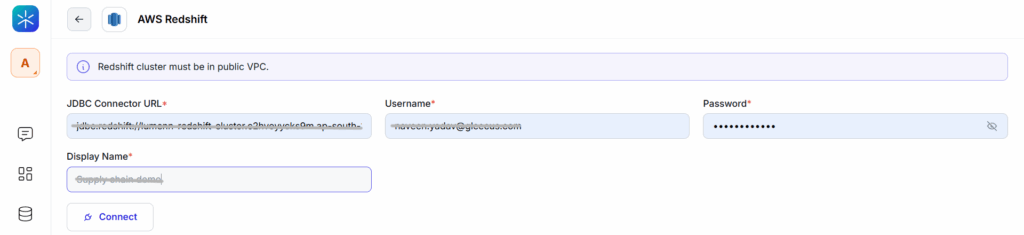
Enter the required fields:
JDBC Connector URL
Username
Password
Display Name
Click
Connect
.
Select the tables you want Lumenn AI to analyze.
Click
Save
.
How to Connect AWS S3
How to Connect Snowflake